
Custom Object Permission Control
Custom Object Permission Control allows admins to define who can view and who can create records within each custom object. This ensures sensitive data is only accessible to the right teams.
On this page
How it works
Each custom object has its own permission settings, letting you control access per object, not globally.
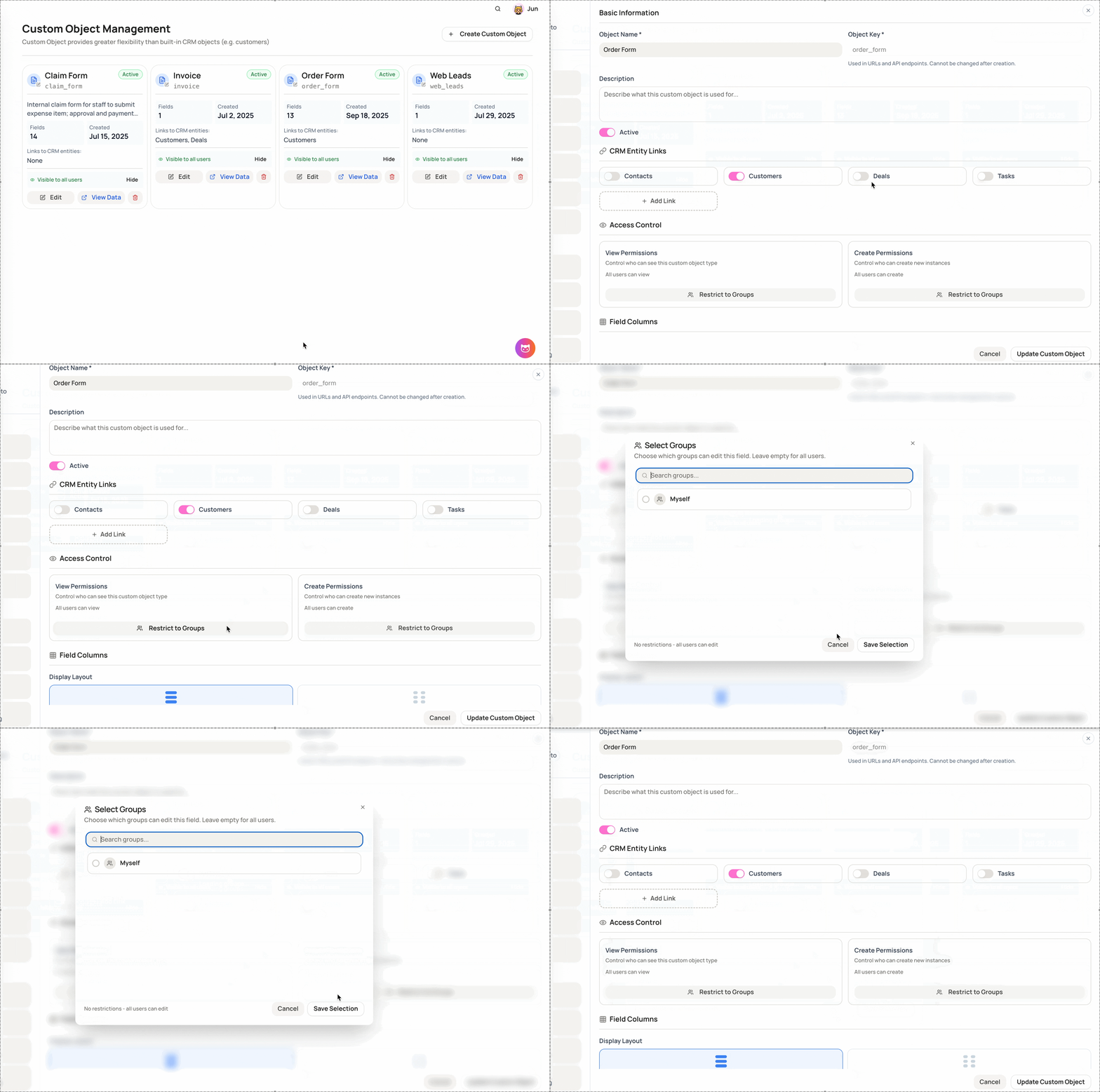
Step 1: Open Custom Object Management
-
Go to Settings
-
Select Custom Object Builder
Step 2: Choose a custom object
-
From the Custom Object list, select the object you want to manage
-
Click Edit
Step 3: Open Access Control
- Inside the object editor, select Access Control
Step 4: Configure permissions
You can manage the following settings:
-
View Permissions
- Control which user groups can view records of this custom object
-
Create Permissions
- Control which user groups can create new records for this custom object
Step 5: Save changes
- Permissions are applied immediately after saving
Notes
-
Permissions are managed per custom object
-
Users without permission will not see the object or its records
-
Only admins can modify access control settings
This feature gives you fine-grained control over how custom objects are accessed across your organization.